In the recent times, AI generated content has taken a huge popularity on social media, there are countless of accounts posting these seemingly cringy AI videos and getting lots and lots of views. There are complete AI influencers promoting products and sponsors.
So I thought how difficult would be to create a similar workflow for myself. After putting some thought over it, I decided to build it on n8n. There was no particular reason other than that I am a huge n8n fanboy and It was months back when I created something useful on it. The last attempt was this↗.
Let’s get started.
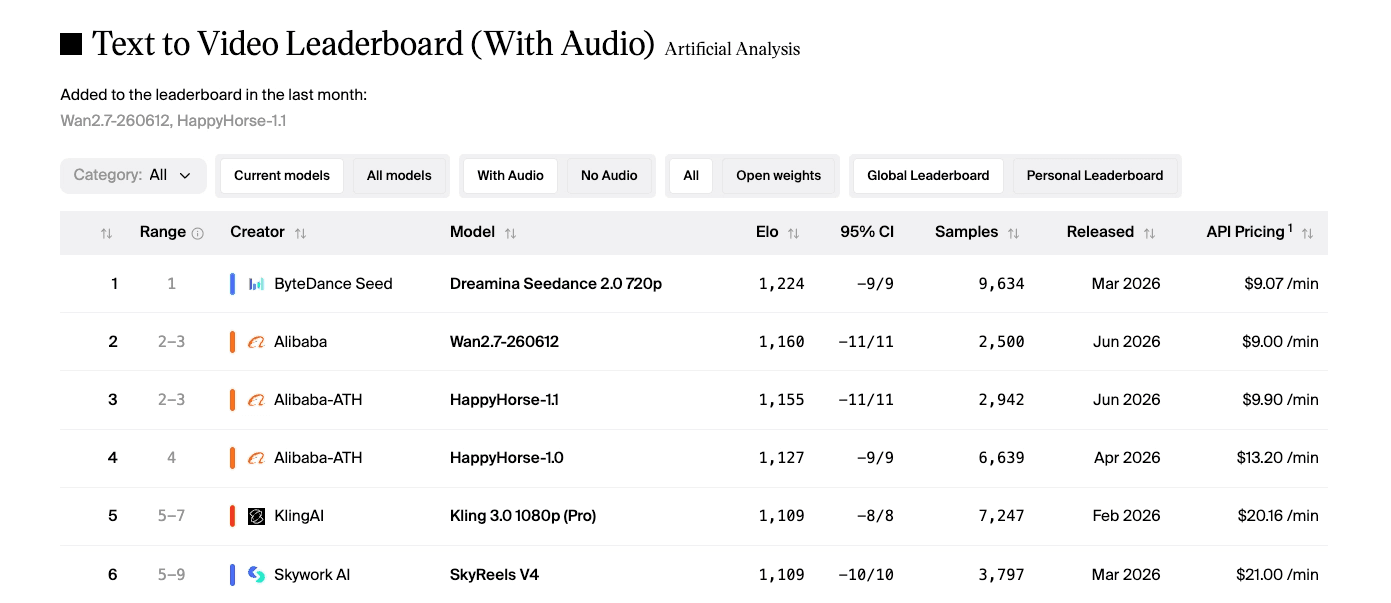
I did some research through the model ranking sites and found out that ByteDance’s Seedance 2.0 is best suited for my kind of work.
Seedance’s output quality is very good. You get director level camera control like you can tell where to pan and zoom, it supports native audio generation in multiple languages including Hindi and the physics seem natural enough.
This Seedance family of models has different variants, I choose the “reference-to-video” as it supports inputing Images, videos and even audio references with the text prompt and it then uses them in the actual video output. Like suppose you gave two images of different characters to the model, then you can refer them in your prompt like “@Character1 dancing with @Character2”, which is super cool.
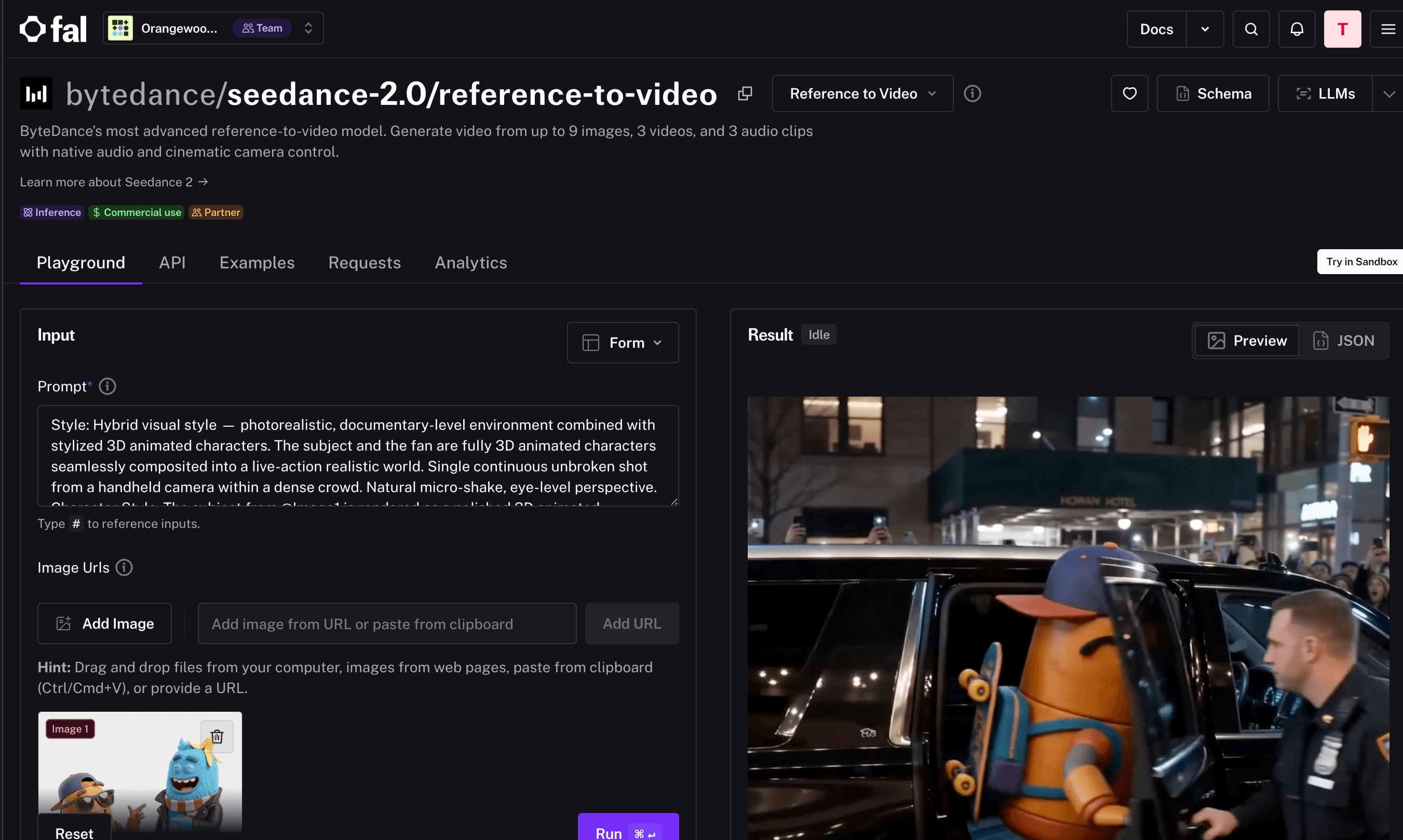
Then comes the question of which inference provider to use, I have always leaned towards Fal.ai↗, which is one of my favourite places to try out new models. They are very quick to add the latest models.
The Workflow
Instead of me manually finding ideas and giving prompts. I decided to let a AI agent handle the this as well. I started by finding some good prompt examples specific to the Seedance models that I can give my AI agent as few shot examples.
Here is the exact system prompt for my prompt generation AI agent:
# Prompt
Generate a funny instagram reel showing typical indian business problems, in cartoon style.
This needs to be fast paced and 30 seconds. no subtitles or text.


# Style
I need this in cartoon animated 2d format.


# Sample Example Prompt Format:
Example 1:
Style: Hybrid visual style — photorealistic, documentary-level environment combined with stylized 3D animated characters. The subject and the fan are fully 3D animated characters seamlessly composited into a live-action realistic world. Single continuous unbroken shot from a handheld camera within a dense crowd. Natural micro-shake, eye-level perspective.
Character Style: The subject from @Image1 is rendered as a polished 3D animated character with stylized proportions, soft subsurface skin shading, expressive features, and clean rim lighting — while maintaining a perfectly consistent face and the exact outfit from the reference image. The fan they interact with is also a 3D animated character in the same rendering style. Both characters retain cinematic CG quality with realistic interaction with the surrounding light (flash bounces, streetlight highlights, shadow casting on real ground).
Lighting & Environment: Fully photorealistic. Nighttime at an upscale event in New York City. Illuminated by real streetlights and camera flashes. Mixed reflections on polished surfaces (phones, cars), soft realistic shadows, and a slight atmospheric haze for depth. The crowd, barricades, hotel facade, SUVs, and street are all live-action realistic — only the two main characters are stylized 3D.
Subject: The 3D animated subject maintains a calm, controlled presence with a subtle, confident smile, perfectly matching the face and outfit from @Image1.
Action Sequence: The shot begins completely immersed in a restless, chaotic realistic crowd behind barricades. The view is partially obscured by real people raising smartphones to record. As the camera lifts slightly above shoulder level, the 3D animated subject exits a luxury hotel in the background. Bright media flashes erupt, illuminating the CG character against the realistic environment. Real security personnel step into frame, pushing the crowd back, causing the camera to shake naturally. Through shifting gaps in the crowd, the animated subject walks forward clearly into center frame. The subject pauses to interact with a 3D animated fan, leaning in briefly for a selfie while giving a calm, controlled wave. The camera pans to follow as a luxury convoy of three premium black SUVs (photorealistic) pulls up. A real security guard opens the back door of the middle SUV. The animated subject steps inside, rolls down the window to wave one last time, and the vehicles begin to pull away as the realistic crowd jumps to capture the moment.
Audio: Loud, chaotic crowd cheering and whistling. Overlapping voices shouting the subject's name. A barrage of rapid camera shutter clicks. Distant New York City sirens and traffic. The rustling of heavy fabric and footsteps. The deep, heavy bass of an SUV engine idling and pulling away.


Example 2:
A hyper-realistic UGC-style medium close-up of a woman in her late 20s standing in her sunlit bedroom in front of a slightly messy bed with white linen sheets, filmed vertically as if she's holding her phone at arm's length for a TikTok or Instagram Reel; she has shoulder-length honey blonde waves, light freckles, natural glowy skin with minimal makeup, wearing a cream ribbed tank top and high-waisted jeans, holding up a compact mirrorless camera on [Image1] in one hand close to the lens so it's clearly visible, her expression bright and genuine — not overly polished — as she says directly to the camera: "Okay I never do this, but I genuinely have to talk about this camera — I've had it for three weeks and it has not left my bag, the photos look like film straight out of it, no editing, and it literally fits in my jacket pocket"; she then turns the camera around to briefly show its compact size against her hand, the background featuring a wooden dresser with scattered jewelry, a small vase of dried flowers, soft morning light pouring through sheer white curtains, a framed poster slightly crooked on the wall, and a houseplant in the corner, all captured with the slightly wider phone-lens distortion, natural skin texture including pores, subtle handheld shake, ambient room tone, and unfiltered warm color grading that feels like an authentic creator review rather than a produced advertisement.


# Example 3
Spy thriller style. Front-tracking shot of a female agent in a red trench coat walking forward through a busy street, pedestrians constantly crossing in front of her. She rounds a corner and disappears. A masked girl lurks at the corner, glaring after her. Camera pans forward as the agent walks into a mansion and vanishes. Single continuous take, no cuts


# Example 4
15s commercial. Shot 1: side angle, a donkey rides a motorcycle bursting through a barn fence, chickens scatter. Shot 2: close-up of spinning tires on sand, then aerial shot of the donkey doing donuts, dust clouds rising. Shot 3: snow mountain backdrop, the donkey launches off a hillside, text 'Inspire Creativity, Enrich Life' revealed behind it as dust settles


# Example 5
Camera follows a man in black sprinting through a crowded street, a group chasing close behind. The shot cuts to a side tracking angle as he panics and crashes into a roadside fruit stall, scrambles to his feet, and keeps running. Sounds of a frantic crowd.


# Example 6
A spear-wielding warrior clashes with a dual-blade fighter in a maple leaf forest. Autumn leaves scatter on each impact. Wide shot pulls into tight close-ups of parrying blades, then cuts to a slow-motion overhead as both leap into the air


# Example for longer videos and how to split the prompts:
Prompt 1: Medium shot of the character from the input image already mid-action, unleashing fast, aggressive punches into a heavy bag, each strike sharp and powerful, body twisting with intensity as anger fuels every movement.
[cut] Close-up shot of his fists smashing into the bag in rapid succession, sweat flying with every impact, the leather visibly deforming under each punch, cinematic slow-motion accents, dramatic lighting, shallow depth of field.
[cut] Side tracking shot as he continues the relentless barrage, shoulders and core rotating with explosive power, breathing heavy, jaw clenched, muscles tensed, determination and rage evident in every movement.


Prompt 2: Extend @Video1 suddenly a loud off-screen voice cuts through, "STOP IT!" His punches slow mid-motion, tension breaking as he hesitates.
[cut] Medium shot as he fully stops, chest rising and falling, hands dropping slightly while he looks confused and disoriented, the bag still swinging in front of him.


Keep doing like this until the whole video prompt is covered.


# Character Prompt Guidelines
You will also need to generate a prompt for a image generation model to generate a image of the character.
- Include front only of the characters (if multiple characters are present).
- Overall, use a white background only.
High resolution, professional.


# Video Spliting
The current AI model has a limitation that it can only generate videos up-to 15 seconds in length, so you need to split the prompt into a array if the video is longer. Please maintain the same context, style and environments across the prompts. Refer to the earlier generation as @Video1 or @Video2.
I am also generating a prompt for a separate Image generation model for my characters, I found it better to give a visual reference for my characters than to describe them as text to the Seedance model. Also, it helps in maintaining constancy across multiple video generation runs.
The character generation step basically uses the GPT Image 2 model to generate a high res character avatar with a white background.
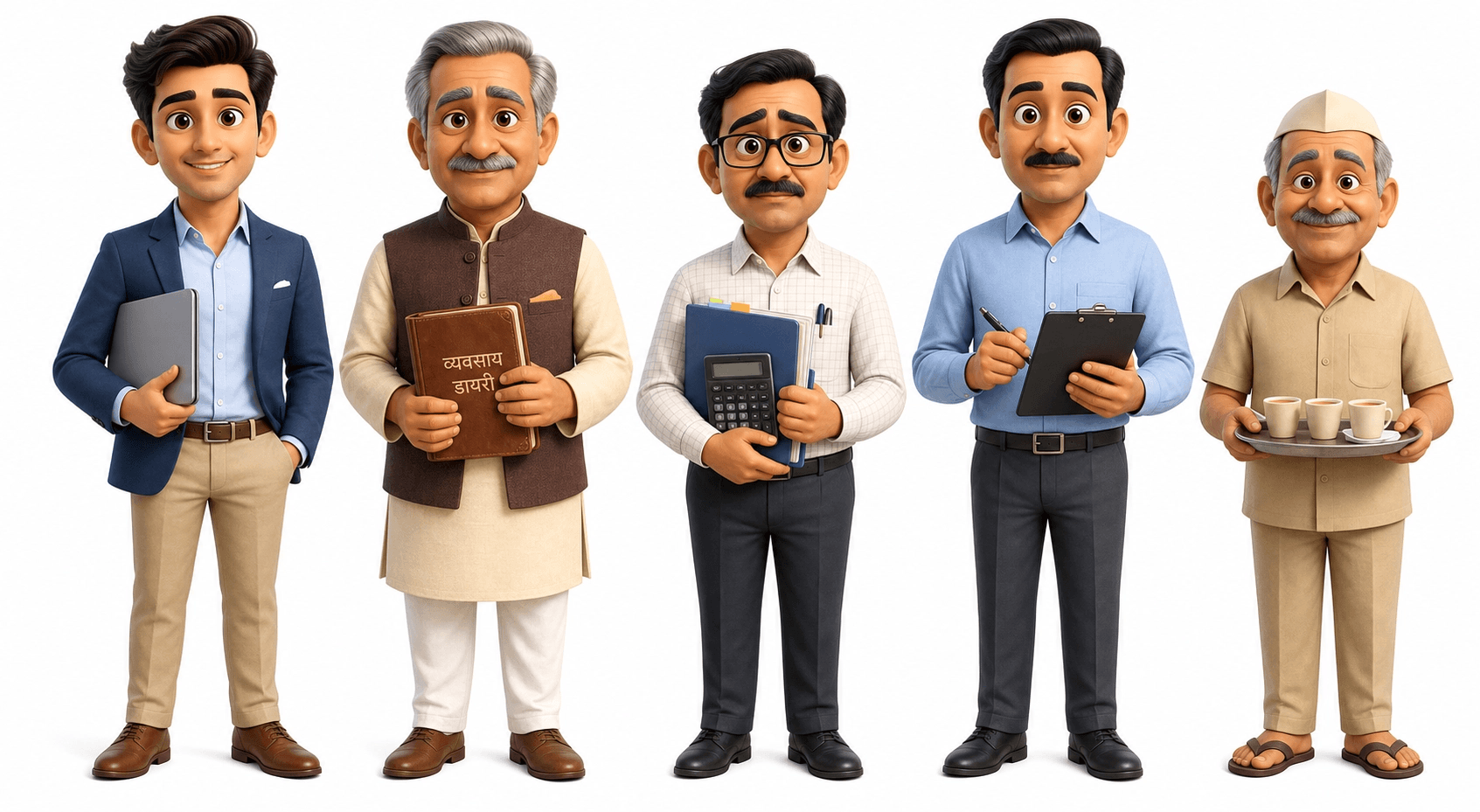
These characters are referred in the prompt as well. Like “@Person1 shakes hand with @Person2” and so on.
Also, there’s a limitation with the Seedance model, it can, at max output 15 seconds of video at one go. So to go over this limitation, I have instructed the Prompt generation agent to split the prompt into multiple separate “sub” prompts. When giving the sub prompts to Seedance model, I provide the previous generation to the model and refer it in my next sub prompt.
This gives me surprisingly good results. Seedance extends the first video and now I can generate longer videos.
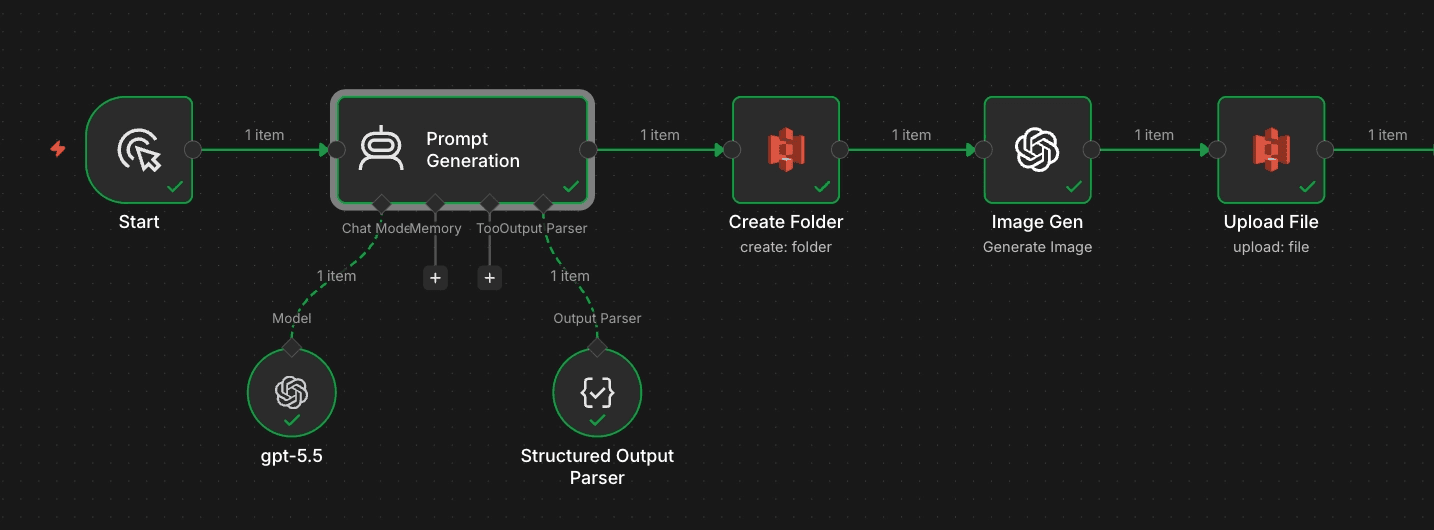
This covers the setup, the prompt and character generation part of my workflow. The nodes after the Prompt Generation agent are basically creating a S3 bucket and uploading the character images in the bucket and getting a public link that I can send to Seedance later on.
Video Generation Step
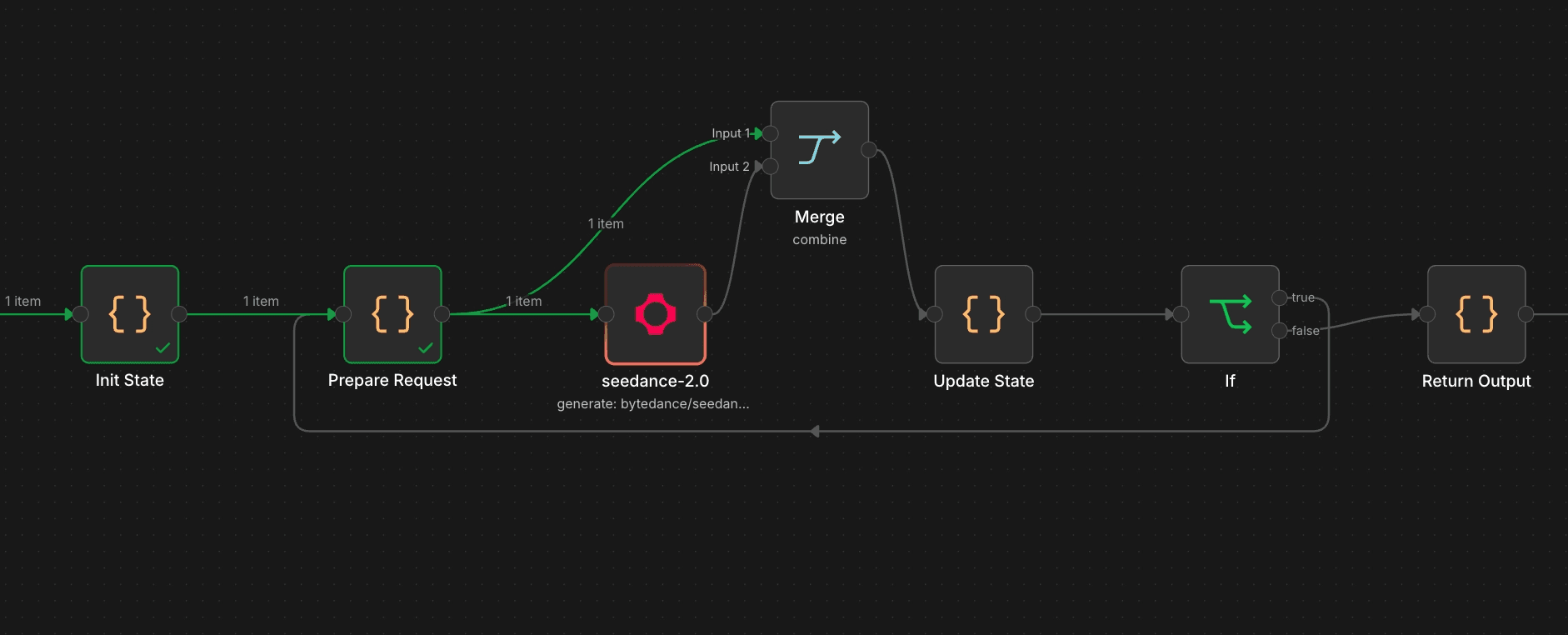
This is the main part of our workflow, at this step we are setting up a loop and sending prompts one by one to our Seedance model. We take care of the fact that for the very first pass we give the link of the character image generated by GPT Image 2 earlier as a context. Then for every subsequent pass, We give the previous video generation’s link as a context to extend and use as a starting point.
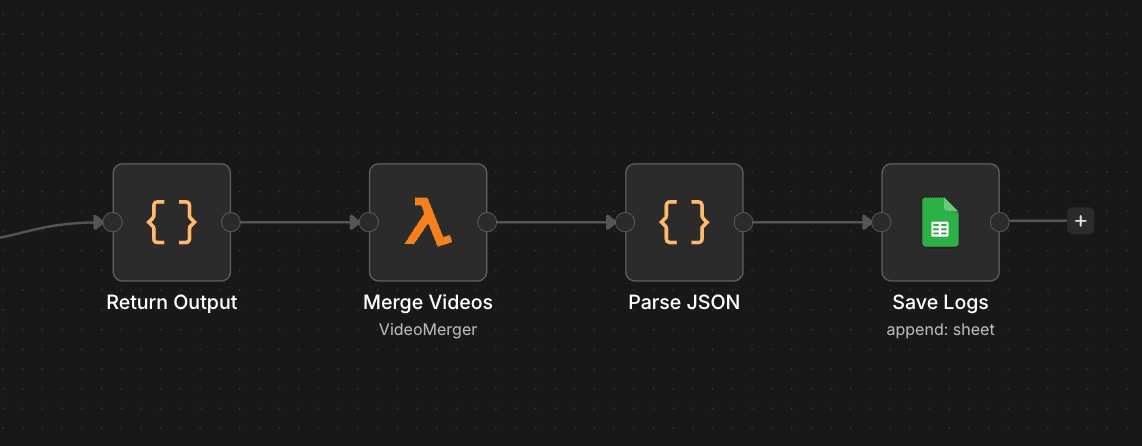
When all the smaller video clips are generated, we need to stitch them together to form a compete video. For this I build a Lambda function that takes a array of video links and then joins them together using FFmpeg and then uploads the final joined video to S3 and returns the URL.
After this joining step, our workflow is essentially complete. I have added a Google Sheets node to save all my video creation links as record.
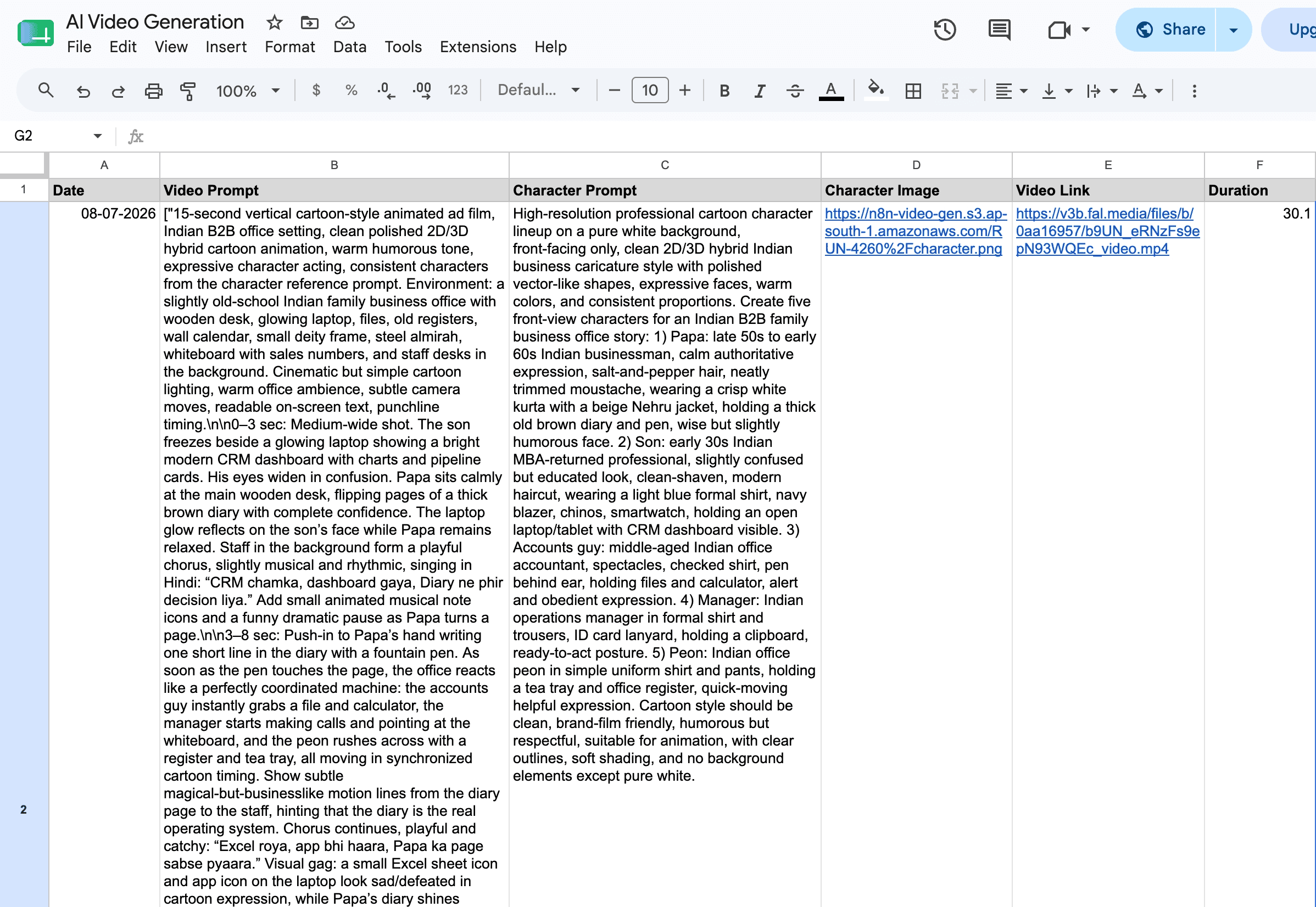
Some Samples
Here are some of the video generation runs I did with this workflow.
For a 30 second clip this workflow takes around 18 to 20 minutes.